
Die Work at Home DVDs sind Updates. D.h. Wenn man ein bestehendes System hat, löscht man das vorherige NICHT weg, sondern bootet mit der WAH Windows 7 DVD, löscht die vorhandene Partition mit dem alten Windows, kreiert eine neue Partition und installiert Windows 7 da hinein. Nach dem löschen der Partition darf man nicht mehr unterbrechen, weil sich der Installer beim Starten anschaut, ob ein Windows vorhanden ist. Wenn man die Möglichkeit nicht hat oder man schon vorher das alte Windows entfernt hat, kann man den offizielle Weg von Microsoft gehen Windows 7 zu installieren und KEINEN Produkt Key bei Anfrage einzugeben. Danach wieder von der Installations DVD booten, Partition löschen und neu installieren. Dieses mal kann man den Produkt Key eingeben. D.h. der Installer nimmt auch eine nicht aktivierte Version als Möglichkeit für ein Upgrade.  ODER man vertraut auf den Registry Hack, der bestens funktioniert. Hier eine der vielen Anleitungen, die man im Internet findet: Open regedit.exe with Start Menu Search and navigate to: HKEY_LOCAL_MACHINE/Software/Microsoft/Windows/CurrentVersion/Setup/OOBE/
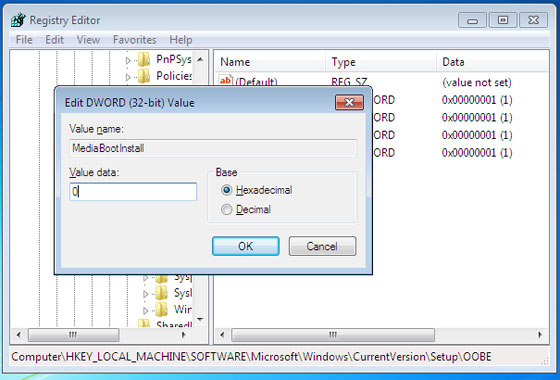
 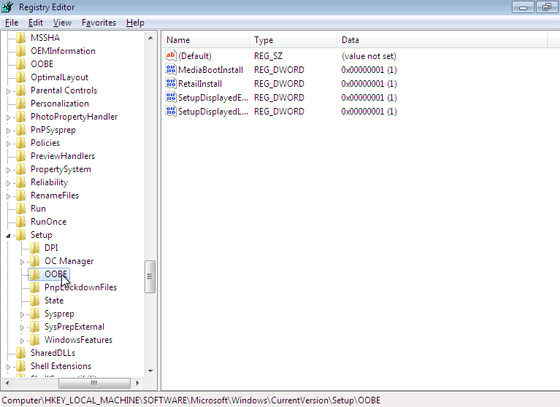 Change MediaBootInstall from „1“ to „0“. (Double-click it and then enter 0 in the dialog that appears.)
  Close RegEdit. Open the Start Menu again and type cmd in Start Menu search to display a shortcut to the Command Line utility. Right-click this shortcut and choose „Run as administrator.“ Handle the UAC prompt. In the command line window, type: slmgr /rearm Then tap ENTER and wait for the „Command completed successfully“ dialog.
 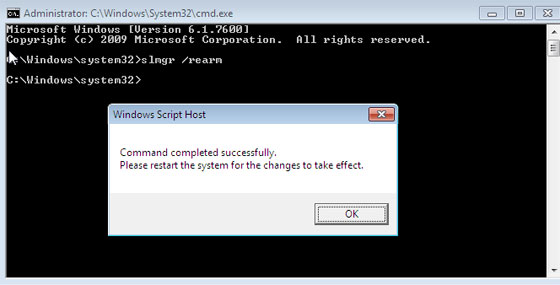 Then, close the command line window and reboot. When Windows 7 reboots, run the Activate Windows utility, type in your product key and activate windows. If it works, you’re all set. You’re done. Congratulations. If this does not work, you can try two different things: First, ensure there are no pending Windows Updates to install. In my experience, some of these can cause this method to fail. Install them and reboot PC. Re-run the command line (with administrative privileges) noted above, reboot again, and re-attempt the activation. Wenn das nichts hilft, eben noch einmal mit der Installations DVD neu installieren…
