
Wer sein Windows 10 mit seinem Microsoft Account verknüpft, um z.B. das Reactivate after Hardware Change zu bekommen, der muß sich nach jedem Boot mit dem Paßwort anmelden. Wem das auf den Keks geht, der folge dieser Anleitung von http://www.intowindows.com/how-to-automatically-login-in-windows-10/:
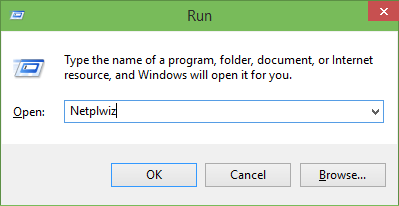
Step 1: First step is to open Run command box by simultaneously pressing Windows logo and R keys (Windows+R). In the Run dialog box, type Netplwiz and then press Enter key.
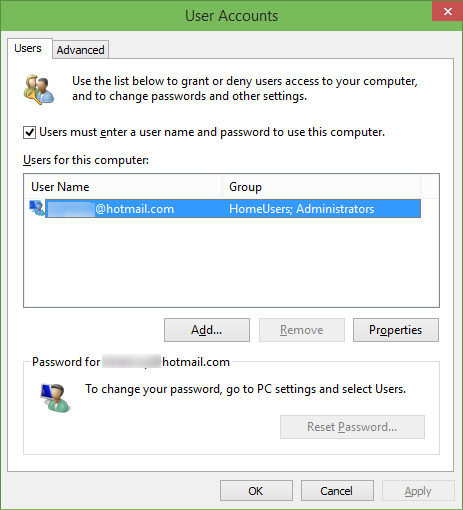
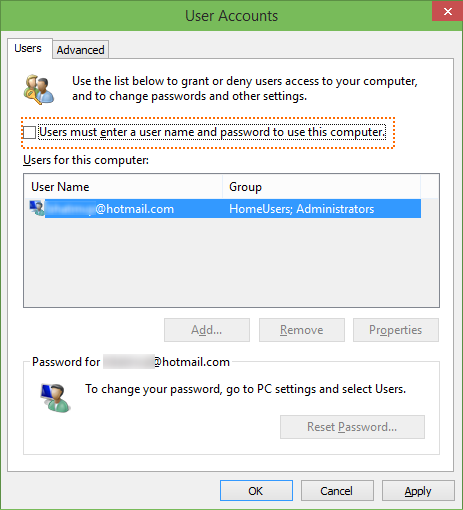
Step 2: In the resulting User Accounts dialog, select your user account first and then uncheck the option labelled Users must enter a user name and password to use this computer. Click Apply button to seeAutomatically sign in box.
Step 3: In the Automatically sign in dialog, type your password and then re-enter the password to confirm the same.
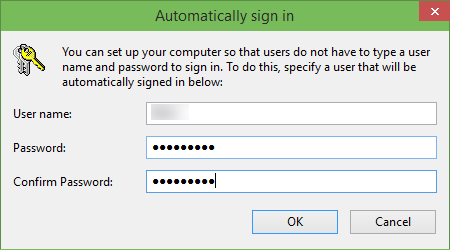
Finally, click OK button.